Posts

Showing posts with the label Adobe Photoshop

Doxie Dash

Image
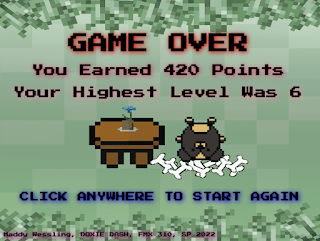
***IMAGE FLASH WARNING: PLEASE DO NOT WATCH THE VIDEO IF YOU ARE SENSITIVE TO MOVEMENT OR FLASHING LIGHTS*** Here is my final Creative Coding project, the OOP game! My game is called Doxie Dash and the goal is simple: eat as much food as possible without eating worms! Food increases your points, and worms decrease your points. Whoever has the most points wins, or go for your own high score!  If you would like to play the game for yourself, you can play it here :  Doxie Dash Fantastical Facts: Doxie Dash Edition: This project is 717 lines in total, including all of the external Javascript files. That isn't too bad, but the file size is by far the biggest one yet, with all of the images and music elements.  These characters may look familiar, and that is because they are from my last project! I did make more doxies other than Coco! They are all named after real life doxies in the code!  I really wanted the levels to change without having to collect the worms, however, ...
Coco Sprite Sheet

Image
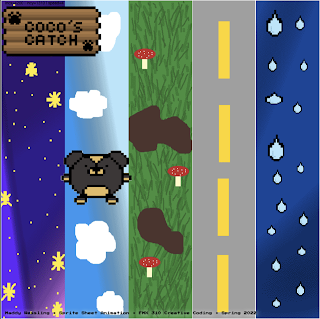
  ***IMAGE FLASH WARNING: PLEASE DO NOT WATCH THE VIDEO IF YOU ARE SENSITIVE TO MOVEMENT OR FLASHING LIGHTS*** Here is my Sprite sheet project! This leads up to the next final project, which is making a game in Dreamweaver! But for this project, we needed to take either 8-bits of our own creation, or photos of ourselves and create a sprite sheet out of it using Dreamweaver and Photoshop. I also used two extra programs to create the 8-bits: Piskel and Pixilart, both free online. I am really happy with how this piece turned out! I love how Coco looks and moves! It is not perfect, but for my first time creating and animating 8-bits, I think it turned out well!  Fantastical Facts: Sprite Sheet Edition: This project is 437 lines in total, which isn't that much compared to other projects. However, the most time consuming part wasn't the code, but the creation of the 8-bits, sprite sheet, and backgrounds.  I chose to make 8-bits rather than use photos of myself because the final...

SYSTEM ERROR

Image
  ***IMAGE FLASH WARNING: PLEASE DO NOT WATCH THE VIDEO IF YOU ARE SENSITIVE TO MOVEMENT OR FLASHING LIGHTS*** Here is my Eternal Motion project! For this project, we needed to take an image, crop out all of the body parts, and make them move eternally. I also added some extra flashing shapes and text to give the piece some more style. I like how this piece turned out! I think it really puts together Freddy as an animatronic and coding skills into one piece.  Fantastical Facts: Eternal Motion Edition: This project is 881 lines in total! Not that bad for everything that was imported and moved around! I chose Glamrock Freddy from Five Nights at Freddy's Security Breach because I really like his connection with Gregory in the game and thought an animatronic would be perfect for this piece. Some of the text are lines from the game and some of it is some I made up while making the project. I thought that the arms kind of look like Freddy was cleaning up something so I decided to ta...

Image Mandala

Image
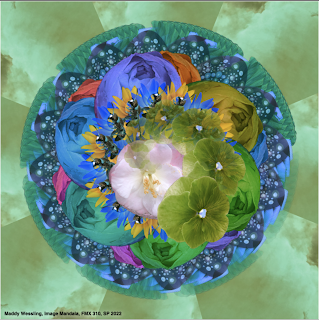
***IMAGE FLASH WARNING: PLEASE DO NOT WATCH THE VIDEO IF YOU ARE SENSITIVE TO MOVEMENT OR FLASHING LIGHTS*** Here is my Image Mandala project! Our assignment for this project was to take 10 images that we took ourselves, and make it into a mandala using both Dreamweaver and Photoshop. This project was so much fun for me! I really enjoyed how much creative freedom we had with the coding process and that we had to take the pictures ourselves. The mandala is for sure one of my favorite projects I've done so far in Dreamweaver! Fantastical Facts: Image Mandala Edition: This project is 619 lines total! It isn't a whole lot compared to a code like Totoro, however, the effects that can be made in those lines are incredible! It goes to show that sometimes less can be more.    The background image is of a sunset from my backyard. The bee towards the center and some of the flowers are from flowers that I used to grow in high school for FFA. Some of the other flowers and the leaves are f...

Final Animation

Image
Here is my final animation video! This is a final project for my Digital Media class. We needed to take our GIF animations and compile them into one video. Also, we needed to add sound and credits at the end. This project was difficult, if I am honest, but I love how the final product looks and sounds! I used Adobe Photoshop, Premiere, and Garageband to complete this project. I am very pleased with my progress overall this semester, and the art I have created.  Fantastical Facts: Animation Edition: In addition to the GIF animations, this project took well over 24 hours to complete! I survived on caffeine.... The actual hula hoop is a weighted hula hoop and it is a thicker and heavier type of hoop. I used that one as opposed to a regular one because it would be easier to trace in the final version.  I was really surprised at how big the files were! I had to do a lot of editing in order to get each section under 1 MB. It makes me realize just how big movie files must be... Overa...

GIF Animation

Image
Here is my completed version of my GIF animation! For this project we needed to take a 30-second video and create an animation of it frame by frame! I had a lot of fun exploring with the different colors and backgrounds! The hardest part was tracing each individual frame. It took a lot of work and effort, but it was really cool to see how it all came together in the end. I really really like how this project turned out! Fantastical Facts: GIF Animation Edition: This project took more than 24 hours to complete! I had roughly 6 hours of sleep while doing this project... Each GIF has around 90 frames which were all hand-traced in photoshop.  The first background is an iceberg, the third is of space, and the last is of Mt.Fuji. All of them were slightly edited to fit the style that I wanted for the GIFs.  One thing I have learned from working in Photoshop this semester is hair is a real pain! It was still hard for me to get the hair right on each layer, even with my hair pulled al...

Autoscopy

Image
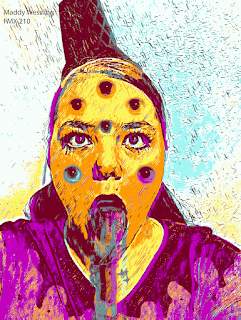
  Here is my final edit of my Autoscopy project! This one was a lot of fun! The original piece that was submitted for review was the last one. I liked it a lot, (as well as the other ones included with the submission, not pictured), however, I wanted to explore the GIF files more than I did originally. I ended up with the five versions seen before the original!  Fantastical Facts: Autoscopy Edition: At first, I had no idea what I was going to do for this project. We needed to tell a story and I was not sure how to make a meaningful story with the image I had. I ended up being inspired by a Dairy Queen ice cream cone I had a few nights before the due date. Personally, I have an anxiety disorder and sometimes it feels like all of my feelings, good and bad, come out at once, like an ice cream cone melting.  The shirt melting was all hand traced by me in photoshop! I was really impressed with how clean the lines came out!  I am not actually barfing a rainbow in the origi...

BW to Color

Image
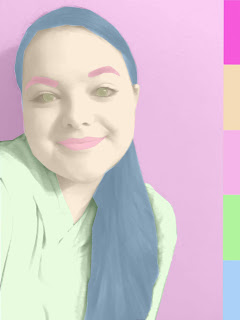
  Here is my completed Black and White to Color project! The original image used was taken by me simply in a room with a plain wall. This made the process easier to distinguish where I was compared to the wall in the production process. Before I added the color to the image, I changed the photo to black and white. I also made masks, which aren't perfect. I tried to fix the small errors with the eyes and the hair later, however, it only made matters worse. This final version is the original version that was turned in. Fantastical Facts: BW to Color Edition: The first palette is a square palette. The second palette is an an analogous, and the third is a complementary palette. These color combinations were made using Adobe Color! It is a great resource for making palettes that you can reuse for digital art.  The eyes and the hair have some small mistakes in the lines. They look a little funky, but overall I liked how the piece works conceptually and I decided to keep it.  Ha...

Multiplicity Project

Image
  Here is my Multiplicity Project! For this project we needed to use Photoshop to place ourselves in the same photo 6 times! For this, my dachshund Coco, joined me! I had a lot of fun creating this project and I am really happy with how the final layout turned out! Fantastical Facts: Multiplicity Project: A HUGE shoutout to both my mom (for keeping the camera perfectly aligned) and to Coco (for putting up with all of the costume changes and the sheer amount of photos we took)!  I was really not sure how these pictures were going to look together, especially with a live dachshund in every shot, but all of them ended up meshing together without too much trouble! It was challenging to put Coco in and to keep her focused in the camera, however, I thought it was a fun idea to have a dress-up party so I am extremely happy with the results! (Don't worry, Coco got plenty of rest and a BIG treat afterwards!)  The picture on the back right is one of my favorite pictures of Coco and...

Somewhere Project

Image
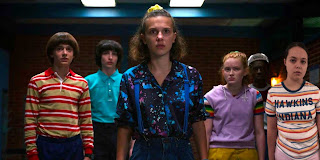
Here is my finished project for our "Somewhere" photoshop assignment! I had SO much fun with this one! We needed to take a scene from a movie or TV show and photoshop ourselves into it. I chose Stranger Things for this project.  I am a huge fan of the show and had a good time creating this piece. Fantastical Facts: Stranger Things Edition: The episode that this scene is from is called "The Sauna Test" from season 3.  It is where the kids try to get the Mind Flayer out of Max's brother, Billy using a sauna. I personally really like this episode because of its intensity and I wanted to try to fit myself in with the other kids.  The shirt was actually a Christmas gift a few years ago and I decided it would be fun to wear it as if I was from Hawkins.  Taking the picture on a neutral background (aka a bedroom wall in my house) really helped with the cleaning and editing for this project!  A big shoutout to my mom for helping me take a perfect picture! Thank you Hall ...