Posts

Showing posts with the label Hall of Fame Piece

Innocence Castle

Image
Here is my sixth and final project for my Multimedia Installation class! This project was to create something personal on any scale or any subject we chose! I decided to use a white wooden castle, some doll furniture, and childhood images for my project. The song used in the video is 'Tiger Tiger' by Webkinz.  Fantastical Facts: Innocence Castle Edition: The castle I used is a smaller wooden castle that was painted white. Then my mom helped me cover all of the windows and place a small piece of paper in each section in order for the images to appear clearly. Each section has a different theme. One is images of my family's first home. Two are of fun moments from my childhood. One is special events (birthdays, Halloween, etc). One is of my cousins and I at my cousin's birthday party. Another is my stuffed cat, Kiki, changing colors. I also included one of some of my other stuffed animals and another funny clip of me dancing when I was younger. In total, there are ten diff...

Halloween Projection

  Here is my fourth project for my Multimedia Installation class! This project was very special! My classmates and I were asked by a client to project some spooky footage using MadMapper onto their house for Halloween! My assigned window is to the right of the door and on the bottom part of the window (with all of the cats, ghosts, and eyes).  Fantastical Facts: Halloween Projection Edition: This project was a lot of fun! It was my first time using MadMapper and projecting onto something so large! It was also my first project for a client!  I was surprised at how much physical work went into making the projections happen. Putting up the screens, setting up the projectors, and measuring the space took a lot of time, but it turned out really good in the end!  It was so fun to see people enjoying the projections and asking us questions about the process! Nothing made me happier than seeing the large smiles on everyone's faces and made all of the hard work so worthwhile!...

Fragmented Video- Doxies In Space

Image
Here is my second project for my Multimedia Installation class! For this project, we needed to create a fragmented video with 6 to 9 squares all with footage that went together. I decided to step out of the box a bit and create a 6 canvas wide painting that when put together, makes one giant painting called, Doxies In Space ! I filmed the footage of myself painting it and made the clips into 6 sections to achieve the product. Fantastical Facts: Doxies In Space Edition: All together, the footage took a little over 2 hours to film and paint! Each clip had to be filmed one at a time, panel by panel. It took about a week of prep work as well, drawing on the canvases and getting all of the supplies set.  After each panel was filmed, I then converted all of the files over to my computer to save space. Because I filmed on my IPhone 8, I didn't have a lot of space to work with storage wise.  Once I had everything filmed, I made the panels using precise math in Premiere Pro. Then I edi...

Videoart- Beauty is Error

***IMAGE FLASH WARNING: PLEASE DO NOT WATCH THE VIDEO IF YOU ARE SENSITIVE TO MOVEMENT OR FLASHING LIGHTS*** Here is my first project for my Multimedia Installation class! This class will be very different from what I have done in the past, using new techniques and software. Our assignment was to create a one minute video, including credits, on the topic of "embracing the error." All sound was made using Garageband and mixkit.co.  Fantastical Facts: Beauty is Error Edition: Beauty is Error is about embracing the error in the way that women think about their bodies. We have pre-conceived notions that out bodies should look a certain way, and we should embrace the way we naturally are more often.  I am not a huge video editor so I am really proud of how I was able to create different effects using Premiere Pro. Messing around with different effects and speeds was a lot of fun and something different from what I usually do!  I am also not used to making sound for pieces so i...

Doxie Dash

Image
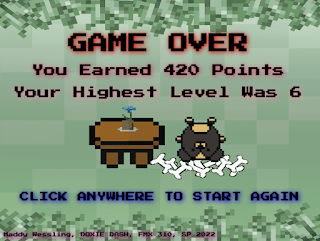
***IMAGE FLASH WARNING: PLEASE DO NOT WATCH THE VIDEO IF YOU ARE SENSITIVE TO MOVEMENT OR FLASHING LIGHTS*** Here is my final Creative Coding project, the OOP game! My game is called Doxie Dash and the goal is simple: eat as much food as possible without eating worms! Food increases your points, and worms decrease your points. Whoever has the most points wins, or go for your own high score!  If you would like to play the game for yourself, you can play it here :  Doxie Dash Fantastical Facts: Doxie Dash Edition: This project is 717 lines in total, including all of the external Javascript files. That isn't too bad, but the file size is by far the biggest one yet, with all of the images and music elements.  These characters may look familiar, and that is because they are from my last project! I did make more doxies other than Coco! They are all named after real life doxies in the code!  I really wanted the levels to change without having to collect the worms, however, ...

Coco Sprite Sheet

Image
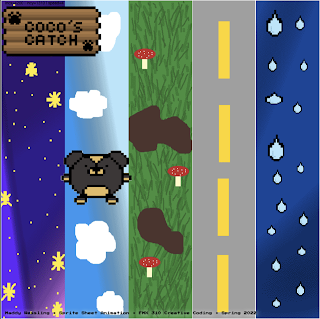
  ***IMAGE FLASH WARNING: PLEASE DO NOT WATCH THE VIDEO IF YOU ARE SENSITIVE TO MOVEMENT OR FLASHING LIGHTS*** Here is my Sprite sheet project! This leads up to the next final project, which is making a game in Dreamweaver! But for this project, we needed to take either 8-bits of our own creation, or photos of ourselves and create a sprite sheet out of it using Dreamweaver and Photoshop. I also used two extra programs to create the 8-bits: Piskel and Pixilart, both free online. I am really happy with how this piece turned out! I love how Coco looks and moves! It is not perfect, but for my first time creating and animating 8-bits, I think it turned out well!  Fantastical Facts: Sprite Sheet Edition: This project is 437 lines in total, which isn't that much compared to other projects. However, the most time consuming part wasn't the code, but the creation of the 8-bits, sprite sheet, and backgrounds.  I chose to make 8-bits rather than use photos of myself because the final...

Things My Grandpa Told Me

Image
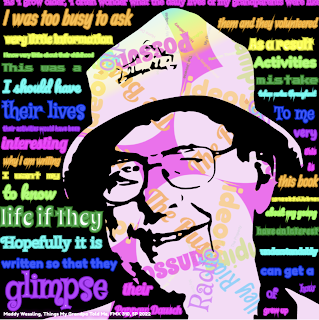
  ***IMAGE FLASH WARNING: PLEASE DO NOT WATCH THE VIDEO IF YOU ARE SENSITIVE TO MOVEMENT OR FLASHING LIGHTS*** Here is my Kinetic Typography project! For this assignment, we needed to take  text from an existing piece of work and put it into an interactive canvas. We had a lot of freedom in what we wanted to use for this project and I chose a very special piece of text and image for mine. I LOVE how this piece turned out! It is one of my favorite pieces to date. Fantastical Facts: Kinetic Typography Edition: This project is 1,959 lines in total, including the Javascript files. This one was not as much as the last project, but still pretty hefty in the file size with all of the text. It didn't break my computer this time, but was close a few times!  The image used is my Grandpa Fred who sadly passed away a few years ago. Before he passed, he wrote all of his grandchildren a book called, "Things I Wish My Grandparents Told Me", about his life and childhood. I used text from...

It's My Party

Image
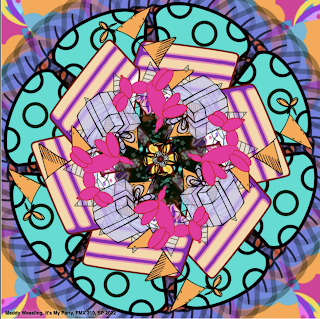
  ***IMAGE FLASH WARNING: PLEASE DO NOT WATCH THE VIDEO IF YOU ARE SENSITIVE TO MOVEMENT OR FLASHING LIGHTS*** Here is my Illustrator Mandala project entitled, "It's My Party!" For this project we needed to take more complicated images than the Image Mandala and take them into Adobe Illustrator, simplify them, and make a mandala out of the images in Adobe Dreamweaver. These images were imported using Javascript files, so that way we were able to make cool changes to the images without having a disorganized code. Fantastical Facts: Illustrator Mandala Edition: This project is 6,261 lines total! This is by far the biggest project so far! A good amount of the lines were generated from Illustrator and then made into Javascript files, however, they are still counted in the total as they are referenced in the main source code.  It was a challenge in this project to find images that weren't too complicated so that way the code could run without crashing the computer. Luckily...

Vector Mandala

Image
***IMAGE FLASH WARNING: PLEASE DO NOT WATCH THE VIDEO IF YOU ARE SENSITIVE TO MOVEMENT OR FLASHING LIGHTS*** Here is my Vector Mandala project! Our objective for this assignment was to make shapes and vectors out of code and then create a mandala. We needed to have at least 10 different canvases, each with their own interactive element. I tried something a little bit out of what I usually create and decided to use more black elements to create a space theme. I am really happy with how this piece turned out and I am glad I went a little out of my comfort zone with the colors!  Fantastical Facts: Vector Mandala Edition: This project is 896 lines total! Still not my biggest project but for sure  broke my computer! The hefty code broke my high-powered Macbook Pro at least 3 times!  With the code being so large, I wasn't able to achieve everything I originally wanted. I wanted the center planet to be rotating in color, like my previous project, but it was just too much on the ...

Image Mandala

Image
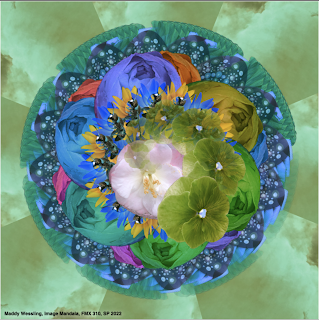
***IMAGE FLASH WARNING: PLEASE DO NOT WATCH THE VIDEO IF YOU ARE SENSITIVE TO MOVEMENT OR FLASHING LIGHTS*** Here is my Image Mandala project! Our assignment for this project was to take 10 images that we took ourselves, and make it into a mandala using both Dreamweaver and Photoshop. This project was so much fun for me! I really enjoyed how much creative freedom we had with the coding process and that we had to take the pictures ourselves. The mandala is for sure one of my favorite projects I've done so far in Dreamweaver! Fantastical Facts: Image Mandala Edition: This project is 619 lines total! It isn't a whole lot compared to a code like Totoro, however, the effects that can be made in those lines are incredible! It goes to show that sometimes less can be more.    The background image is of a sunset from my backyard. The bee towards the center and some of the flowers are from flowers that I used to grow in high school for FFA. Some of the other flowers and the leaves are f...

Blue Totoro's Sunset

Image
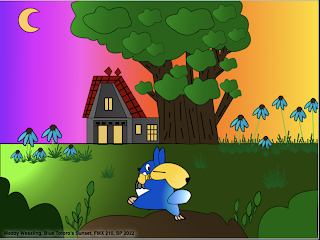
This is my first project in my Creative Coding (FMX 310) class! It is titled, "Blue Totoro's Sunset." The image is based off of Studio Ghibli's "My Neighbor Totoro." It is one of my favorite movies, and probably my favorite Studio Ghibli film, so I created an Illustration and then recreated it in code for this project. The only parameters for this project was to have detail and to have something move within Dreamweaver. I am so proud of how this turned out! It is my favorite Dreamweaver project yet!  Fantastical Facts: Blue Totoro Edition: The original illustration was actually once two. When I showed my teacher Santi some sketches from my sketchbook for this project, I planned on doing my D&D Koi Mermaid character. However, my teacher actually liked the Blue Totoro and background flowers as they were two separate sketches. He told me to combine them and create a background which is the final rendition!  The house is based off of Satsuki and Mei's ho...

Final Animation

Image
Here is my final animation video! This is a final project for my Digital Media class. We needed to take our GIF animations and compile them into one video. Also, we needed to add sound and credits at the end. This project was difficult, if I am honest, but I love how the final product looks and sounds! I used Adobe Photoshop, Premiere, and Garageband to complete this project. I am very pleased with my progress overall this semester, and the art I have created.  Fantastical Facts: Animation Edition: In addition to the GIF animations, this project took well over 24 hours to complete! I survived on caffeine.... The actual hula hoop is a weighted hula hoop and it is a thicker and heavier type of hoop. I used that one as opposed to a regular one because it would be easier to trace in the final version.  I was really surprised at how big the files were! I had to do a lot of editing in order to get each section under 1 MB. It makes me realize just how big movie files must be... Overa...

GIF Animation

Image
Here is my completed version of my GIF animation! For this project we needed to take a 30-second video and create an animation of it frame by frame! I had a lot of fun exploring with the different colors and backgrounds! The hardest part was tracing each individual frame. It took a lot of work and effort, but it was really cool to see how it all came together in the end. I really really like how this project turned out! Fantastical Facts: GIF Animation Edition: This project took more than 24 hours to complete! I had roughly 6 hours of sleep while doing this project... Each GIF has around 90 frames which were all hand-traced in photoshop.  The first background is an iceberg, the third is of space, and the last is of Mt.Fuji. All of them were slightly edited to fit the style that I wanted for the GIFs.  One thing I have learned from working in Photoshop this semester is hair is a real pain! It was still hard for me to get the hair right on each layer, even with my hair pulled al...

Multiplicity Project

Image
  Here is my Multiplicity Project! For this project we needed to use Photoshop to place ourselves in the same photo 6 times! For this, my dachshund Coco, joined me! I had a lot of fun creating this project and I am really happy with how the final layout turned out! Fantastical Facts: Multiplicity Project: A HUGE shoutout to both my mom (for keeping the camera perfectly aligned) and to Coco (for putting up with all of the costume changes and the sheer amount of photos we took)!  I was really not sure how these pictures were going to look together, especially with a live dachshund in every shot, but all of them ended up meshing together without too much trouble! It was challenging to put Coco in and to keep her focused in the camera, however, I thought it was a fun idea to have a dress-up party so I am extremely happy with the results! (Don't worry, Coco got plenty of rest and a BIG treat afterwards!)  The picture on the back right is one of my favorite pictures of Coco and...

Somewhere Project

Image
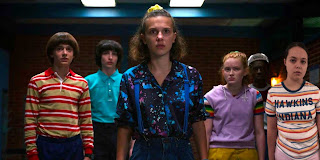
Here is my finished project for our "Somewhere" photoshop assignment! I had SO much fun with this one! We needed to take a scene from a movie or TV show and photoshop ourselves into it. I chose Stranger Things for this project.  I am a huge fan of the show and had a good time creating this piece. Fantastical Facts: Stranger Things Edition: The episode that this scene is from is called "The Sauna Test" from season 3.  It is where the kids try to get the Mind Flayer out of Max's brother, Billy using a sauna. I personally really like this episode because of its intensity and I wanted to try to fit myself in with the other kids.  The shirt was actually a Christmas gift a few years ago and I decided it would be fun to wear it as if I was from Hawkins.  Taking the picture on a neutral background (aka a bedroom wall in my house) really helped with the cleaning and editing for this project!  A big shoutout to my mom for helping me take a perfect picture! Thank you Hall ...

H.O.P.E.

Image
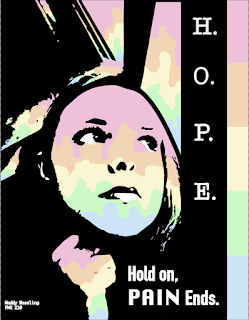
  Here is my finished design for my latest project! I LOVE how this piece turned out! Of course I had to use my favorite pastel colors. The rainbow just makes me very happy and I thought the colors fit well here with the stark black contrast. Fantastical Facts: Poster Edition This took a little longer than I had anticipated. I had a hard time finding the right picture to turn into black and white, and that would fit with the quote I was using. The final reference image was actually taken during a rough time and really fits the context of the quote so I am happy this image translated well. I like how the window looks like it is dripping down with the rainbow colors. In the original image, it was raining outside, so I decided to make it look it like it was raining a rainbow outside.  Believe it or not, the reference image was taken on a school bus! The final black and white image doesn't really look too much like a bus but I am really glad the background looks the way it does....

Business Cards & Logo

Image
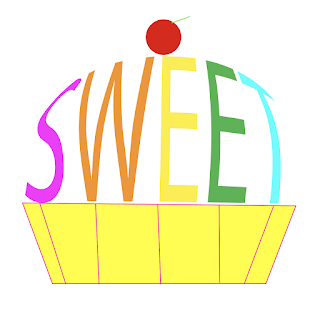
  Here are my final designs for my Digital Media class! For this project, we needed to create a business logo and cards based off of a word that best describes us! I chose the word 'sweet' after a lot of debate. All objects are made in Illustrator, apart from the mood board and the sketches. Fantastical Facts: Sweets Inc. Edition: Sweets Inc. is not a real company, just made for the purpose of this project! Please don't contact any of the information listed, as it is fake! !! All of this is just a demo !! I almost chose the word 'colorful' and made a paintbrush instead of the letter 'l', but liked the sweet logo SO much that I decided to do that instead Thank you to Mom and Dad for helping me pick out the words, final designs, and supporting my work! You guys are the best! ❤️ Hall of Fame Piece 💫 As always, thank you for supporting this small artist and blog! I hope you enjoy the work as much as I do when I create it! Have a magical day! -Maddy Wessling